
Calibrite Display 123
4.0Editor score
Simple 1 2 3 workflow
USB C connection support
Dual display calibration
This guide compares top colorimeter for monitor calibration tools to help you achieve accurate color, consistent workflows, and reliable display performance
Finding the right colorimeter for monitor calibration is essential for creators who need precise color accuracy. A good device ensures your edits match the final output across different screens and devices without guesswork.
We evaluated leading models based on sensor quality, software features, and ease of use. Each product supports modern displays including OLED and Mini LED while offering reliable results for professionals and enthusiasts.
Every pick highlights key strengths and ideal use cases so you can choose confidently. Prices may vary over time so check current listings before purchasing to ensure you get the best value today.
4.0Editor score
4.5Editor score

4.0Editor score
This table compares key specs across all ten colorimeter options to help you quickly identify the best fit for your display type and workflow needs.


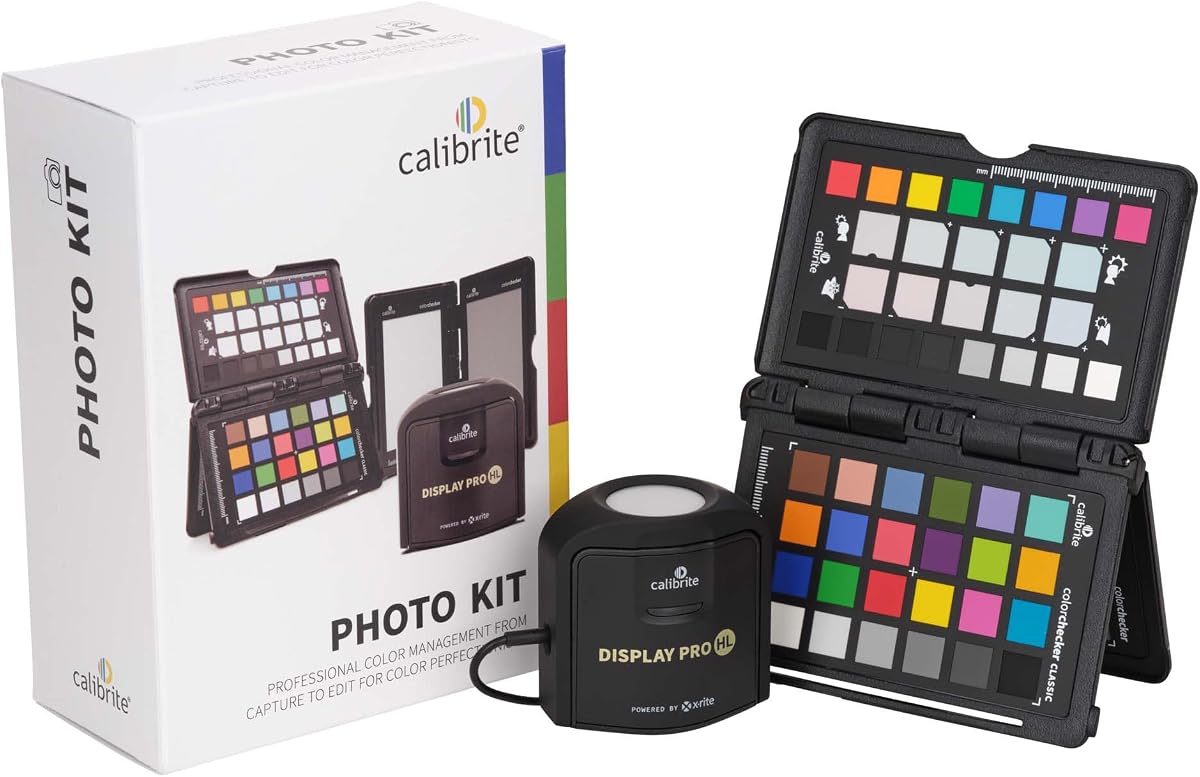
The Calibrite Photo Kit stands out as our Editor's Choice with its comprehensive approach to color management. It combines a high performance monitor colorimeter with camera profiling tools to ensure consistency from capture through final edits.
We may earn a commission when you buy through this link, at no additional cost to you.
This kit includes the Display Pro HL which measures ultra bright displays and the ColorChecker Passport Photo 2 for RAW workflows. The PROFILER software allows detailed control over white point and gamma to match your specific creative needs.
While the price reflects its professional features the investment pays off in reduced color guesswork. The main tradeoff is the learning curve for new users who may need time to master the advanced settings.
Photographers working with modern displays will find this kit invaluable. It delivers reliable results across sessions and locations making it the top pick for serious creatives seeking precision.
Matching camera profiles with calibrated monitors ensures your final edits reflect what you captured without unexpected color shifts.
Support for mini LED and OLED panels means you can trust your screen accuracy even with the latest high dynamic range technology.
We may earn a commission when you buy through this link, at no additional cost to you.
The Calibrite Display Plus HL targets professionals who work with HDR and super bright displays. Its advanced sensor measures up to 10000 nits ensuring accurate calibration for modern high dynamic range screens.
We may earn a commission when you buy through this link, at no additional cost to you.
Video editors benefit from support for Rec.709 and BT.1886 tone curves. The PROFILER software offers full control over white point and contrast while validation tools confirm your calibration results.
This device excels for broadcast grading but may be overkill for casual users. The advanced features justify the cost for teams needing consistent color across multiple editing stations.
If you need precise calibration for HDR monitors this is the best premium choice. It provides the precision required for professional video production and color critical workflows.
The HL sensor ensures highlights and blacks are accurately represented which is vital for HDR grading and mastering.
Shared presets and custom patch sets help teams maintain consistent results across different workstations and locations.
We may earn a commission when you buy through this link, at no additional cost to you.
The Calibrite Display 123 offers excellent value for creators needing reliable calibration without extra complexity. Its guided 1 2 3 workflow makes setup fast for photographers and designers.
We may earn a commission when you buy through this link, at no additional cost to you.
You can calibrate two displays to match color across your workspace. The built in before and after check lets you confirm improvements instantly after each calibration session.
While it lacks advanced video or HDR controls it handles standard photo editing needs well. The tradeoff is a simpler interface which suits users who want accuracy without deep technical settings.
This is the ideal budget choice for hobbyists and professionals starting with color management. It provides solid results at an accessible price point for most desktop and laptop displays.
The simplified workflow reduces setup time letting you focus on editing rather than tweaking complex calibration parameters.
Matching two displays ensures your secondary screen shows the same colors as your primary monitor during editing.
We may earn a commission when you buy through this link, at no additional cost to you.
The Calibrite Creator Kit is designed for hybrid shooters who need consistent color across both stills and video. It pairs the Display 123 monitor colorimeter with the ColorChecker Passport Video 2.
We may earn a commission when you buy through this link, at no additional cost to you.
Passport Video 2 helps set white balance and exposure on set so footage matches your calibrated monitor. This reduces trial and error corrections during post production and saves editing time.
The Display 123 is entry level but fits the kit budget. While it lacks advanced HDR capabilities it provides accurate calibration for standard SDR workflows in creative projects.
Videographers who shoot photos occasionally will benefit most from this system. It bridges the gap between still and motion workflows ensuring color integrity from capture through delivery.
Passport Video 2 provides immediate reference checks in changing lighting conditions so exposure matches your expectations.
Consistent reference points mean less time correcting color and more time focused on creative decisions.
We may earn a commission when you buy through this link, at no additional cost to you.
Datacolor Spyder offers unique features like DevicePreview which simulates how photos appear on other devices. Its ambient light sensor adjusts brightness settings based on room conditions for consistent viewing.
We may earn a commission when you buy through this link, at no additional cost to you.
Calibration takes around 90 seconds and covers modern displays including OLED and Mini LED. Custom profiles react to light level changes helping maintain accuracy in variable lighting environments.
The DevicePreview feature is a standout for web designers and social creators. While the software requires initial setup it guides users effectively without overwhelming them with technical details.
This model suits photographers who need to preview client views. The combination of speed and ambient awareness makes it a strong contender for daily use.
Seeing how your images render on different screens helps avoid surprises before clients or viewers receive your work.
Automatic profile updates based on room light keep your monitor accurate even when you move between office and home.
We may earn a commission when you buy through this link, at no additional cost to you.
The Calibrite ColorChecker Display Pro is optimized for projector profiling and larger venue setups. Its optical design ensures high repeatability across different display types.
We may earn a commission when you buy through this link, at no additional cost to you.
The rotatable diffuser arm acts as a stand for tabletop use and covers optics for protection. Integrated tripod mounting makes it practical for installations in event spaces.
While it supports monitor calibration it shines in projection workflows where standard meters struggle. The ccProfiler software provides professional control and validation for large screen needs.
Event creatives and presenters will find this tool valuable. It delivers consistent color for projectors where lighting conditions vary significantly.
The diffuser arm allows multiple orientations so you can mount the device on tripods or flat surfaces easily.
Tripod compatibility ensures stable readings during large scale installations in auditoriums or conference halls.
We may earn a commission when you buy through this link, at no additional cost to you.
The Datacolor Spyder5PRO delivers professional results for photographers needing print accuracy. Room light monitoring ensures your brightness matches ambient conditions so shadow details remain consistent.
We may earn a commission when you buy through this link, at no additional cost to you.
Full calibration completes in five minutes with a detailed before and after evaluation using your own photos. Display analysis compares performance across multiple monitors for workflow consistency.
While older it still handles standard SDR workflows reliably. The print match feature helps avoid wasted ink by ensuring screen colors align with printed output.
Serious photographers prioritizing print output will appreciate this tool. It provides the accuracy needed to match digital edits with physical prints.
Matching monitor and printer output saves materials and ensures client expectations align with final deliverables.
Comparing multiple displays helps you identify drift quickly before it impacts client work or final exports.
We may earn a commission when you buy through this link, at no additional cost to you.
The ASUS ProArt CaliControl offers unique hardware features including built-in dial shortcuts and OSD control. It measures up to 10000 nits and supports both hardware and software calibration.
We may earn a commission when you buy through this link, at no additional cost to you.
The integrated ASUS Dial lets you map shortcuts directly to the device for quick parameter changes. Its reversible USB C connection ensures fast and effortless connectivity with modern computers.
While innovative the product has compatibility limitations reported by users. It works best for those already invested in the ProArt ecosystem for seamless integration.
If you need direct hardware control and shortcuts this meter stands out. Just verify software compatibility before purchase to avoid integration issues.
OSD control lets you adjust settings without leaving your editing app for uninterrupted workflow.
Custom shortcuts reduce mouse movement so you stay focused on creative adjustments.
We may earn a commission when you buy through this link, at no additional cost to you.
The Datacolor Spyder4Pro features double-shielded filters for improved accuracy and stability. It offers automated color and brightness calibration to make setup simple.
We may earn a commission when you buy through this link, at no additional cost to you.
The ReCAL assistant lets you quickly recalibrate to compensate for display drift. Its single sensor supports multiple displays so you can calibrate a laptop and desktop efficiently.
While older it remains functional for basic needs. The stability improvements over previous generations ensure reliable results for standard workflows.
Budget conscious users needing dependable calibration will find this suitable. It handles daily maintenance without requiring advanced knowledge.
ReCAL helps you adjust for changes quickly so your workflow stays consistent over time.
One sensor calibrates multiple screens so you avoid buying separate meters for each workspace.
We may earn a commission when you buy through this link, at no additional cost to you.
The Datacolor Spyder X Pro uses a lens based engine to provide higher color accuracy. It is designed for first-time users with an intuitive wizard workflow and single-click calibration.
We may earn a commission when you buy through this link, at no additional cost to you.
SpyderProof allows before and after evaluation using your own images so you see visible improvements. Room light monitoring adjusts settings to maintain consistent brightness levels.
It supports multiple displays and offers twelve predefined targets for flexibility. While mid range in price it balances ease of use with professional accuracy well.
This is ideal for beginners entering color management. It delivers high accuracy without overwhelming users with complex settings.
The wizard guides you step by step so even new users can achieve professional results quickly.
SpyderProof lets you see real differences in your photos confirming the meter improved accuracy.
We may earn a commission when you buy through this link, at no additional cost to you.
Choosing the right colorimeter depends on your workflow needs and display types. Understanding sensor quality and software features ensures accurate results across your devices.
Sensors determine how accurately the device measures color and luminance. Advanced sensors support HDR and super bright displays up to 10000 nits for video editors.
Look for devices with multiple sensors or diffusers for consistent readings across different panel types.
Software guides the calibration process and stores profiles for future use. Advanced tools offer custom patch sets and shared presets for team workflows.
Ensure the software supports your operating system and provides before and after validation tools.
Not all colorimeters support the latest OLED and Mini LED panels. Check compatibility with your monitor technology before purchasing.
Modern meters should support a wide range of laptops and desktop displays for flexibility.
Ambient light sensors track room conditions to adjust display brightness accordingly. This maintains consistent contrast and shadow detail in varying environments.
If you work in changing lighting conditions this feature helps avoid eye strain and color shifts.
Professionals often use multiple screens. A colorimeter that profiles multiple displays ensures consistent color across your workspace.
This feature prevents discrepancies between primary and secondary monitors during editing.
Some kits include camera profiling tools for end to end color consistency. This is valuable for photographers and videographers.
Choose a device that fits into your existing workflow without requiring extra adapters or complex setups.
Guided workflows reduce setup time and simplify calibration for beginners. Look for intuitive wizards and clear instructions.
Simple interfaces help users maintain a regular calibration schedule for accurate results.
Portable devices with protective cases are better for travel and multi-site work. Compact bodies fit easily into camera bags.
A sturdy build ensures longevity and reliable performance in different environments.
Place the device on your screen following the on-screen guide to ensure accurate readings. Use the counterweight if included to stabilize the meter during the process.
Allow your monitor to warm up for at least 30 minutes before calibration to ensure stable brightness levels. This prevents drift during the initial measurement phase.
Store the colorimeter in its case when not in use to protect the lens. Clean the sensor gently with a soft cloth to maintain accuracy over time.
Calibrate every month for professional work and every few months for casual use. Frequent calibration ensures color accuracy remains consistent as displays age.
A colorimeter is essential for precise color work but optional for casual edits. It ensures your photos look correct across different screens and devices.
Yes many colorimeters support multiple displays and save separate profiles. This allows you to match color across primary and secondary screens.
Most modern colorimeters come with dedicated software for calibration. Check compatibility with your OS to ensure seamless integration.
Hardware calibration adjusts the monitor physically while software adjusts graphics card settings. Hardware offers more precise results for professional use.
Some specialized colorimeters support projector profiling. Ensure the device includes a tripod mount or diffuser arm for proper setup.
The top three picks cover budget to premium needs. Each option delivers reliable calibration for photo and video workflows.
Prioritize features that match your display technology and editing requirements for best results.
Verify current availability and pricing before purchasing to ensure you select the right model.