
Thermaltake View 380
4.7Editor score
Hidden-connector motherboard support
Four pre-installed ARGB fans
Pillarless glass panel design
Compare the top dual chamber PC cases for 2026 featuring airflow designs glass panels cooling support and cable management for high-performance gaming builds.
Dual chamber PC cases have revolutionized how enthusiasts build their systems by separating heat-generating components from the power supply. This layout enhances airflow and creates a cleaner aesthetic with tempered glass panels showcasing every internal detail.
Our expert team evaluated ten top models based on thermal performance, build quality, cable management features and compatibility with modern hardware. We prioritized cases that balance stunning visuals with practical functionality for serious gamers.
Each pick highlights specific strengths ranging from budget-friendly options to premium full-tower designs with unique glass curves. Note that availability and pricing fluctuate so always verify current stock before making your final purchase decision.
4.7Editor score
4.7Editor score

4.6Editor score
We compared all ten models side by side to highlight their unique cooling capabilities glass quality and internal layout advantages for various build requirements.


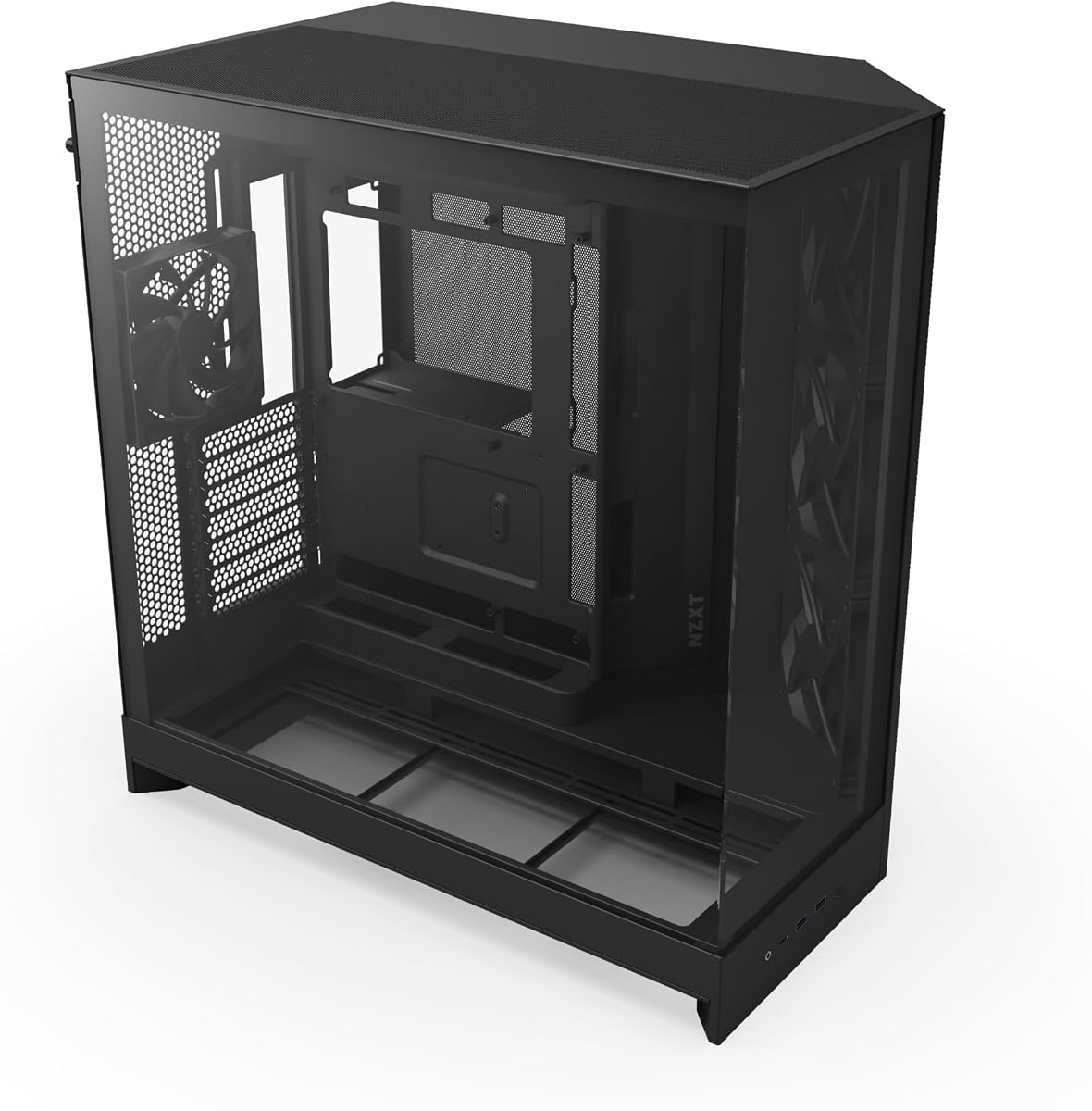
The NZXT H9 Flow stands out as a premier choice for enthusiasts seeking both performance and aesthetics. With a 4.7 rating it delivers exceptional airflow and a panoramic view of your internal components.
We may earn a commission when you buy through this link, at no additional cost to you.
Its dual-chamber design effectively separates heat-generating parts from the power supply improving overall thermal performance. The pre-installed F140Q and F120Q fans ensure immediate efficient cooling for high-performance builds.
While it lacks included dust filters the perforated steel panels and optimized airflow design mitigate dust accumulation effectively. The wraparound tempered glass offers a seamless look though its weight requires careful handling during assembly.
This case is ideal for gamers prioritizing cooling efficiency and visual impact. Its support for back-connect motherboards ensures a clean cable-free look that enhances your build presentation.
Perforated steel panels ensure efficient cooling for high-performance systems while maintaining structural integrity.
Seamless wraparound tempered glass panels showcase every detail of your build with minimal visual distortion.
We may earn a commission when you buy through this link, at no additional cost to you.
The Thermaltake View 380 offers an affordable entry into the dual-chamber world without sacrificing style or essential features. Its pillarless tempered glass panels provide an unobstructed view of your components.
We may earn a commission when you buy through this link, at no additional cost to you.
Equipped with four hydraulic bearing ARGB fans it delivers impressive cooling and lighting out of the box. The case supports hidden-connector motherboards ensuring cleaner cabling and a polished final look.
Users should note that the design limits fan expansion and is strictly compatible with ATX boards. However the included Gen.2 USB 3.2 Type-C port enhances connectivity options for modern peripherals.
This model is perfect for budget-conscious builders wanting premium aesthetics. Its strong 4.7 rating reflects satisfaction with its build quality and visual appeal.
Front and side tempered glass panels remove structural pillars for an uninterrupted panoramic view of internals.
Compatible with hidden-connector motherboards to eliminate visible cables and create a cleaner system layout.
We may earn a commission when you buy through this link, at no additional cost to you.
The HAVN HS 420 redefines premium PC cases with its hybrid design and unprecedented cooling capacity. Featuring eleven 140mm fan slots it supports up to three 420mm radiators for extreme liquid cooling setups.
We may earn a commission when you buy through this link, at no additional cost to you.
Its heat-formed UniSheet glass panel minimizes visual distortion providing a continuous view of your build. The SimpliCable system offers uniquely user-friendly routing for pristine internal organization.
While the price reflects these premium features assembly may require patience due to intricate design elements. The 3-way adjustable GPU bracket ensures stability for even the largest graphics cards available.
High-end enthusiasts will appreciate this case's cutting-edge engineering. It balances stunning aesthetics with professional-grade performance capabilities for demanding workloads.
Heat-formed glass panel engineered with minimal curvature radius to reduce visual distortion significantly.
Top-to-bottom grooved guides and fan hub ensure clean cable routing for a flawless build appearance.
We may earn a commission when you buy through this link, at no additional cost to you.
The NZXT H6 RGB+ brings a compact footprint without compromising thermal performance or style. Its seamless curved glass panel creates a stunning display for RGB lighting and high-end components.
We may earn a commission when you buy through this link, at no additional cost to you.
High-airflow mesh panels across top and front-right optimize cooling efficiency while a removable bottom filter prevents dust accumulation. An integrated adjustable anti-sag bracket supports heavy GPUs effectively.
Building costs can be higher since fans are not pre-installed requiring separate purchases for full RGB functionality. However the space-saving design is perfect for smaller desks or room setups.
Ideal for gamers seeking a compact build that delivers premium visuals. Its thoughtful layout and durable glass construction justify the investment for aesthetic-focused users.
Single-piece tempered glass bent to tight radius offers seamless visual appeal without any seam distortion.
Ultra-fine mesh on key panels maximizes airflow intake and exhaust for optimal component cooling.
We may earn a commission when you buy through this link, at no additional cost to you.
The HYXN H1 delivers impressive value with seven pre-installed ARGB fans and a spacious interior layout. Its 270-degree view creates a breathtaking visual experience for showcasing your hardware.
We may earn a commission when you buy through this link, at no additional cost to you.
Vertical airflow design uses bottom and side intakes to efficiently direct cool air to critical components. The case supports up to two 360mm radiators simultaneously for powerful liquid cooling configurations.
While cable management is functional it lacks advanced routing features found in higher-end models. The daisy chain fan system simplifies RGB control without requiring complex controllers or software.
This case suits gamers seeking immediate RGB aesthetics without extra expenses. Its competitive price and fan count make it a top contender for budget builds.
Pre-installed 7 PWM ARGB fans offer instant vibrant lighting and immediate effective cooling out of box.
Bottom and side air intakes paired with top exhaust optimize heat dissipation efficiently.
We may earn a commission when you buy through this link, at no additional cost to you.
The HYXN H2 2026 provides exceptional space for high-end configurations with eight pre-installed PWM fans. Its large dual-chamber design ensures optimal thermal separation and cable routing for complex builds.
We may earn a commission when you buy through this link, at no additional cost to you.
Supporting GPUs up to 455mm and PSUs up to 220mm this case accommodates even the most powerful components. The rear compartment offers ample room for tidy cable management and airflow optimization.
Its large footprint may require sufficient desk or room space limiting placement options for some users. However the robust ventilation and massive storage capacity ensure hardware longevity and peak performance.
Enthusiasts requiring extreme cooling capacity will find this model ideal. Its combination of large fan support and component clearance makes it a strong choice for custom builds.
Includes 8 PWM fans with 420mm radiator support enabling powerful thermal management for high-end systems.
Wide rear cable channels and tie-down points facilitate organized wiring and clean installation.
We may earn a commission when you buy through this link, at no additional cost to you.
The Antec C8 represents top-tier build quality with its seamless edge glass and spacious interior layout. It offers a full-view experience ideal for showcasing custom water cooling loops.
We may earn a commission when you buy through this link, at no additional cost to you.
Supporting thick 360mm radiators on top bottom and side simultaneously provides unmatched liquid cooling flexibility. The full bottom cut-out enables precise fan bracket positioning for enhanced airflow control.
Since fans are not included buyers must budget separately for high-quality airflow components. This allows total customization but adds time and cost to the initial setup process.
Professionals and enthusiasts demanding premium cooling and aesthetics should choose this model. Its 4.8 rating confirms exceptional reliability and user satisfaction among custom PC builders.
Seamless edge design on front and side panels maximizes visibility of internal hardware components.
Removable bottom section allows interchangeable 120mm or 140mm fan brackets for flexible airflow setups.
We may earn a commission when you buy through this link, at no additional cost to you.
The FOIFKIN F1 delivers a balance of cooling performance and visual appeal with six pre-installed ARGB fans. Its fully transparent high-hardness tempered glass highlights every internal component detail.
We may earn a commission when you buy through this link, at no additional cost to you.
Vertical airflow design ensures efficient intake and exhaust while 360mm radiator support enables powerful liquid cooling solutions. The Type-C 3.0 port adds modern connectivity for high-speed data transfer.
The mid-tower size makes it ideal for standard desks without sacrificing GPU or PSU capacity. While front panel aesthetics remain minimal functionality remains strong for everyday gaming use.
Gamers seeking a reliable mid-tower with pre-installed RGB will appreciate this case. Its solid construction and efficient airflow contribute to its high user satisfaction rating.
Six PWM ARGB fans provide immediate lighting effects and effective cooling upon unboxing.
Fully transparent tempered glass panels showcase hardware with excellent clarity and structural protection.
We may earn a commission when you buy through this link, at no additional cost to you.
The ASUS TUF Gaming GT502 offers a durable and versatile design for serious gamers and creators. Its dual-chamber layout divides cooling zones to optimize airflow for CPU and GPU independently.
We may earn a commission when you buy through this link, at no additional cost to you.
Included vertical GPU mounting options and support bracket allow for stylish card displays without sagging. Tool-free side panels simplify access for hardware upgrades or maintenance tasks.
The tinted glass panels provide a sleek look but may slightly reduce vibrant RGB visibility compared to clear glass. Still the robust materials and build quality ensure long-term reliability.
Gaming enthusiasts seeking professional features will find this case ideal. Its blend of functionality and durability justifies its investment price for high-performance systems.
Dual-chamber design allows separate cooling strategies for CPU and GPU components.
Includes vertical mounting bracket to display graphics cards proudly while preventing sagging.
We may earn a commission when you buy through this link, at no additional cost to you.
The darkFlash DY470 stands out with its unique top-angled glass panel enhancing visual appeal and internal visibility. This design creates a striking centerpiece effect for any gaming room.
We may earn a commission when you buy through this link, at no additional cost to you.
Supporting vertical GPU mounting and 410mm GPUs it offers ample space for powerful builds. The snap-on cable management design ensures tidy wiring and simple installation steps for builders.
Note that an RGB hub is not included so additional accessories may be required for full lighting control. However the case's build quality and thoughtful dust filters maintain component cleanliness.
Users seeking a distinctive design will love this full-tower case. Its blend of unique aesthetics and practical features makes it a top choice for custom gaming setups.
Top-angled glass design enhances aesthetic appeal and offers optimal visibility of internal components.
Snap-on design facilitates hassle-free cable routing for a cleaner internal build layout.
We may earn a commission when you buy through this link, at no additional cost to you.
Selecting the right dual chamber case requires understanding key factors that affect cooling performance aesthetics and hardware compatibility.
Dual chamber cases physically separate power supplies and drives from the motherboard area improving airflow efficiency. This separation ensures heat doesn't recirculate around components maintaining lower operating temperatures.
Look for cases with clear separation lines to maximize cooling effectiveness and cable management simplicity.
Tempered glass panels offer stunning visibility but thickness affects durability and weight. Panoramic or wraparound glass provides seamless visuals while traditional panels offer easier installation options.
Choose glass quality that matches your aesthetic goals and ensures sturdy protection for internal hardware.
Check radiator support sizes and fan slots to ensure your cooling needs are met. Many models support 360mm or 420mm radiators for powerful liquid cooling setups.
Prioritize cases with ample fan slots to allow flexible custom cooling configurations.
Dual chamber cases vary by supported motherboard sizes from ITX to E-ATX. Ensure the case accommodates your specific motherboard dimensions without restrictions.
Verify internal measurements match your motherboard requirements before purchase.
Effective cable management tools like Velcro straps and routing holes maintain clean airflow paths. Cases with dedicated channels simplify complex builds and improve aesthetics.
Look for extra space behind the motherboard tray for hidden cable storage.
Modern GPUs can exceed 300mm in length requiring precise internal clearance. Ensure the case supports your card size plus cooling clearance for optimal airflow.
Check vertical mounting options if you prefer to display your graphics card proudly.
Dual chamber designs often dedicate separate PSU space improving airflow and reducing noise. Ensure sufficient length support for your chosen power supply model.
Separate compartments prevent dust and heat from affecting other components.
Material thickness and construction durability impact long-term reliability and noise reduction. Higher quality cases reduce vibration and provide better structural integrity.
Choose robust materials to protect sensitive electronic components during daily use.
Install components systematically by placing the motherboard first and securing the PSU separately to maintain airflow separation. This ensures proper cable routing and maximizes cooling efficiency within each chamber.
Regularly clean dust filters and glass panels to maintain optimal airflow and prevent dust buildup. Removing filters periodically and using compressed air keeps components cool and operating smoothly.
Avoid placing heavy objects on tempered glass panels and use soft cloths for cleaning to prevent scratches. Proper handling extends the lifespan of your case and maintains its aesthetic appeal.
A dual chamber case separates the motherboard and GPU from the PSU and drives for better thermal performance. This layout enhances airflow and creates cleaner cable management options for builders.
Yes separating heat sources prevents recirculation which lowers component temperatures significantly. Enhanced airflow paths allow more efficient cooling for demanding gaming or workstation setups.
Most support GPUs up to 400mm but always check exact clearance dimensions. Models with adjustable brackets accommodate even the largest modern cards comfortably.
Not all models include pre-installed fans so check product specs carefully. Some budget options require purchasing separate fans for full cooling functionality.
Tempered glass is highly durable and designed to withstand typical usage impacts. Handle with care during cleaning or installation to avoid accidental breakage risks.
Use included Velcro straps and routing channels behind the motherboard tray for tidy cables. Proper cable management improves airflow and aesthetics significantly.
Most cases support ATX boards but verify if E-ATX or ITX models fit your needs. Hidden connector compatibility is an added feature for cable management simplicity.
Use a soft microfiber cloth and mild cleaner to avoid scratches. Remove panels carefully to clean both sides thoroughly without damaging seals.
The NZXT H9 Flow Thermaltake View 380 and HAVN HS 420 represent top choices offering exceptional balance of cooling aesthetics and build quality.
Prioritize thermal performance and airflow design to match your specific hardware needs and cooling requirements for long-term reliability.
Always verify current pricing and stock availability before purchasing to secure the best deal for your next build.